The Gap Nobody in the Tablet Business Wanted to Own
For roughly a decade, the tablet market sorted itself into two comfortable camps. At the top sat the flagship machines: thin, expensive, obsessively engineered, priced in a range that makes most people wince before they scroll. At the bottom sat the disposable tier, the sub-$80 slabs sold in plain white boxes with numbers instead of names, designed to survive a warranty period and not much else. Between them stretched an enormous stretch of actual human need, and for years almost nobody built deliberately for it.
That middle stretch is where real households live. It is the parent who needs a second screen for the kitchen counter but has no interest in paying flagship money for a device that will mostly run video calls, grocery lists, and streaming. It is the seven-year-old who has already broken two devices and who needs something that treats gravity as a design constraint rather than an accident. It is the college student whose budget stopped moving upward three semesters ago, but who still expects a screen that does not visibly stutter when a browser holds twenty tabs.
TABWEE is a brand that looked at that stretch and decided to build for the whole of it at once. Not by releasing one compromise machine aimed at everyone, but by running two clearly separated product tracks under a single storefront: a rugged, parent-controlled kids’ line and a larger-screen productivity line aimed at students and everyday adult users. The company’s own framing for this is “Smart Tech, Stylish Living,” which reads like tagline filler until you notice that the two halves of the sentence map neatly onto the two halves of the catalog. Smart tech for the homework desk. Stylish living for the sofa, the kitchen island, and the shared family calendar.
What follows is an honest walk through how that catalog is put together, what the specifications actually mean once you take them off the marketing graphic and into a day of use, where the approach is genuinely well-reasoned, and where a shopper should still slow down and think.
What TABWEE Is, Stated Plainly
Strip away the storefront tiles and TABWEE resolves into something fairly legible: an Android tablet maker selling primarily through Amazon, positioned firmly in the value segment, with a catalog that runs from about $99.99 to roughly $259. Every device in the current lineup ships on Android 16, which the brand promotes with the tagline “Android 16 Unleashed” and the supporting claim “Smoother, Smarter, Your Tablet Evolved.”
That last phrase is doing more work than it might appear. “Evolved” is a strange word to put on a budget tablet, and it hints at the actual strategy. TABWEE is not trying to convince anyone it builds a cheaper version of a $900 machine. It is arguing that the affordable tablet category itself has been stagnant, and that the money saved by not chasing premium materials can be spent instead on the handful of specifications a person notices within thirty seconds of picking a device up: how the screen moves, how long the battery lasts, how much room there is for apps and schoolwork, and whether the thing came with the accessories needed to actually use it that evening.
Two numbers anchor the catalog. The kids’ devices sit at the entry point, around $99.99, in a 10-inch format. The productivity devices occupy the upper half of the range, in 11-inch and 13.4-inch formats, with the flagship 13.4-inch model topping out near $259. There is no phone line, no laptop line, no smartwatch filler. That narrowness is a feature of the brand rather than a limitation: a company that makes only tablets tends to organize its accessory bundles and its spec decisions around a single form factor, and TABWEE’s bundles make that visible.
Two Tracks, One Household: The Logic Behind the Split
Most value brands diversify sideways. TABWEE diversifies by age, and the reasoning becomes clear once you place the two lines side by side.
The kids’ track assumes a device that will be dropped, sat on, dragged across a back seat, and handed over by a tired parent at 7:40 on a Tuesday morning. Its design priorities are physical survival, content safety, and simplicity of supervision. The productivity track assumes the opposite set of pressures: a user who will not drop it but will absolutely overwork it, running documents, video calls, browser tabs, and now AI-assisted workflows simultaneously. Its priorities are screen area, memory headroom, refresh smoothness, and battery endurance.
Building for both under one roof is not a random expansion. It reflects an observation about how budget purchases actually happen in families. The person buying the kid’s tablet and the person needing a kitchen-and-travel tablet are frequently the same shopper, in the same shopping session, on the same platform. A brand that can answer both questions credibly earns a relationship rather than a transaction. It also gets to share infrastructure: firmware, accessory ecosystems, support processes, and the warranty framework that covers the whole catalog.
There is a subtler benefit here too, and it concerns trust. A shopper who has hands-on experience with one TABWEE device arrives at the brand’s second line already knowing what the company’s quality bar looks like, what its customer service feels like, and whether its spec claims held up. That is a meaningful advantage for a newer name competing against incumbents with decades of brand recognition.
Inside the Kids’ Line: Designing for a Device That Will Be Dropped Before It Is Used
The 10-inch TABWEE kids’ tablet is the clearest expression of the brand’s engineering thinking, because the constraints are so unforgiving. Children’s devices are a brutally honest test: anything that is merely decorative gets stripped away, and whatever remains is what actually mattered.
The case is not an afterthought
The first thing worth noting is that the protective case is not an accessory in the conventional sense. The tablet ships housed in a thick TPU bumper, chunky at the corners and wrapping the full perimeter, in bright blue or bright pink. This is a deliberate departure from the way adult tablets are packaged, where a case is either an optional add-on or a slim magnetic sleeve chosen for how little it does.
TPU, thermoplastic polyurethane, is the right material for this job and the reason it dominates the children’s-device category. It is elastomeric, which means it deforms under impact and absorbs energy rather than transmitting it into the glass. It grips rather than slips, which matters enormously in hands that are smaller than the device. And it is tolerant of the specific way children break things: not a single catastrophic drop onto concrete, usually, but hundreds of small impacts against car seats, floorboards, table legs, and the occasional door frame.
The corner geometry deserves attention as well. Bulky corners are not stylistic naivety. They exist to ensure that a fall lands on foam rather than on the panel edge, which is where the structural weakness of any flat device lives. The bulk is the point.
The stylus is sized for the hand, not the spec sheet
Bundled alongside is a chunky stylus matched to the tablet’s colorway. Adult styluses are engineered to resemble pencils, which is an aesthetic decision inherited from a time when the people drawing on tablets were professionals with trained grip habits. A stylus for a six-to-twelve-year-old should resemble a fat crayon instead, because that is the grip a developing hand naturally uses. Getting this right does more for a child’s handwriting practice and drawing comfort than any pressure-sensitivity figure would.
It also solves a practical problem. Slim styluses roll off tables and vanish into carpet. A chunky one stays visible, stays grippable, and survives the back seat of a car.
Software that assumes the parent has no time
The screen experience is equally purposeful. The interface presents a cartoon penguin theme, which is the surface layer; underneath sits the part parents actually evaluate, and TABWEE organizes it around four clearly labeled pillars: kid account setup, time limits, child lock, and content filtering.
That four-part structure is worth unpacking, because it corresponds to the four questions a parent asks in the order they ask them. Can I make an account for this child specifically? Can I decide how long screen time lasts tonight? Can I physically stop the device when we are eating or sleeping? Can I control what is on it in the first place?
Kid account setup is the foundational step, and it is the one most often done badly in the budget category. A properly implemented child account creates a separate profile with its own app approvals and its own usage history, rather than leaving the device on the parent’s Google account, which is what turns a supervised tablet into an unsupervised one within a week. Time limits give the parent a hard boundary that the device enforces, which is far more effective than a boundary the parent must enforce verbally at bedtime. Child lock addresses the moment-to-moment problem: the tablet is momentarily off-limits, immediately, without negotiation. Content filtering handles the standing case, restricting what can be installed, opened, or reached.
The reason this matters commercially is that parental controls are the actual product in the kids’ category. The hardware is a means to an end. A parent paying $99.99 is not buying a 10-inch display; they are buying permission to hand over a screen without spending the evening monitoring it.
The age range is a hint, not a law
TABWEE positions these devices for roughly ages six to twelve, and that range is informative. Below six, the recommendation is usually that screen exposure stay minimal and heavily mediated. Above twelve, children begin wanting social features, messaging platforms, and privacy expectations that a locked-down kid interface actively frustrates. Six to twelve is precisely the window in which a child wants independence with a tablet and a parent still reasonably expects to govern it.

Inside the Productivity Line: Specifications Selected for Feel
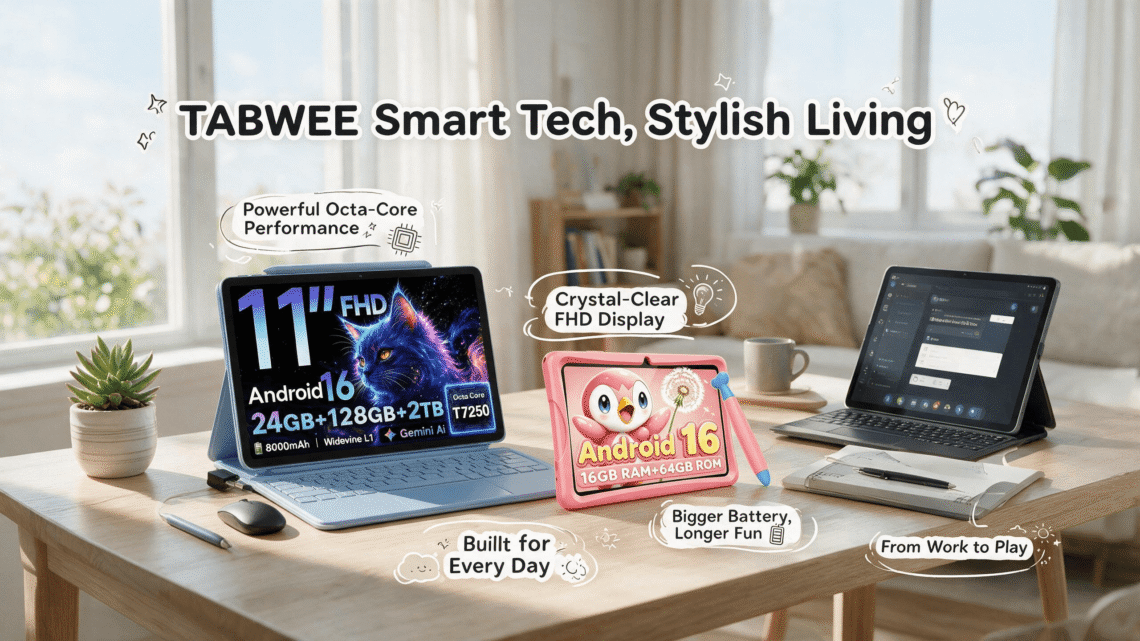
Move up the catalog and the design conversation changes completely. The 11-inch and 13.4-inch models are not ruggedized, not color-coded, and not themed. They are presented in restrained dark finishes, and their marketing graphics shift from cartoon penguins to neon specification callouts: 13.4 inches, 2K resolution, 120Hz refresh, 10000mAh capacity, UNISOC T7280 platform, Gemini on Android 16.
120Hz is a daily-driver specification
Of everything listed, the 120Hz refresh rate is the specification most likely to change how the device feels in the first ten minutes of ownership, and it is a striking inclusion at this price. Refresh rate governs how many times per second the screen redraws. At a conventional 60Hz, scrolling text smears slightly during motion and lifts its gaze only when movement stops. At 120Hz, the same text stays legible while the page moves.
Why does this matter more on a budget tablet than a premium one? Because premium devices compensate for lesser smoothness with very fast processors and high-quality panel materials. A value machine has fewer ways to hide sluggishness. Putting a 120Hz panel on the device is therefore not a vanity specification; it is a highly efficient allocation of limited budget toward the single most perceptible dimension of daily fluidity. Scrolling a document, dragging a window, moving through a settings menu: all of it reads as more expensive than it is.
Screen size as a typing decision
The 13.4-inch format is the other major allocation choice, and it is worth understanding what it buys. A 13.4-inch diagonal places the tablet in the same visual territory as a mainstream ultrabook. Combined with a 2K panel, that gives enough horizontal room for genuine side-by-side work: a document beside a browser, a spreadsheet next to a reference page, a video call alongside notes. On a 10- or 11-inch screen, split view is technically possible and practically miserable. At 13.4 inches, it becomes usable enough that a person stops reaching for a second device.
Resolution interacts with this directly. 2K on a large panel keeps text edges crisp at normal viewing distance, which is the difference between a screen you read on for twenty minutes and one you read on for two hours. For a student working through PDFs, or a remote worker handling email and documents, crispness is not a luxury metric. It is eye strain, or the absence of it.
Memory figures, read honestly
TABWEE advertises upper configurations in the region of 24GB of RAM paired with 256GB of storage on its larger models, and this is the point in the catalog where a discerning shopper should slow down and understand a category convention rather than dismiss the brand.
Like many manufacturers in the affordable Android space, TABWEE’s headline memory figure follows the widely used practice of combining physical memory with a software-reserved extension allocated from storage. The genuine hardware RAM is the smaller portion of the total; the remainder is virtual. This is not a deception specific to TABWEE, and it is not nothing: virtual memory genuinely reduces how often the system has to forcibly close background apps, which is the failure mode that makes budget tablets feel cheap. But 24GB as a total is not equivalent to 24GB of physical silicon, and anyone comparing TABWEE against a flagship on that single number is making an apples-to-oranges comparison.
The honest reading is this. The storage figure, 256GB, is straightforward and generous for the price. The memory configuration, whatever its physical split, is adequate for the multitasking patterns the device is aimed at: browser tabs, office documents, streaming, video calls, and light creative work. It is not adequate for heavy video editing or demanding 3D rendering, and TABWEE does not claim otherwise.
Gemini on a mid-range platform: what the tradeoff actually buys
The most forward-looking element of the productivity line is the integration of Google’s Gemini assistant into an Android 16 experience, and it is here that the brand’s overall philosophy becomes most legible.
The UNISOC T7280 platform at the heart of these models is not a performance chip. It is a competent, power-efficient mid-range SoC designed for mainstream Android workloads. Placed next to a flagship processor, it loses on raw throughput, and there is no point pretending otherwise. But the modern tablet experience has become substantially cloud-dependent in exactly the areas where a mid-range part is not the bottleneck. AI assistance of the Gemini type routes the heaviest inference work to servers rather than to local silicon. The tablet’s job is to send the request cleanly, render the response, and stay cool and quiet while doing it.
That is the quiet logic behind the whole value proposition. TABWEE is not spending the customer’s money on performance a family will never fully load. It spends on the screen, the battery, the memory headroom, the operating system version, the AI access, and the accessories, and it saves on the metal shell, the brand premium, and the benchmark numbers that look impressive in a chart and change nothing about the experience of answering email on a train.
Battery capacity with a purpose
The 10000mAh figure follows the same reasoning. That is a large cell, larger than most 11-inch tablets carry, and its payoff is not a number to recite but a behavioral freedom: a school day, a full flight with a child on one end and a parent on the other, an afternoon outdoors with no outlet in sight. Pair it with the efficiency of a mid-range processor and the result is a device that realistically travels further than its price suggests.

The Bundle as a Design Decision, Not a Promotion
Perhaps the most distinctive element of TABWEE’s approach is how seriously it takes accessories, and this deserves separate treatment because it is where value brands most often engage in theater.
Plenty of sellers advertise a bundle and then fill it with items nobody uses: a lanyard, a sticker sheet, a screen protector of dubious quality. TABWEE’s bundles are more disciplined. On the productivity side, the flagship 13.4-inch model is presented with a keyboard, a mouse, a stylus, a protective case, and chargers. On the kids’ side, the tablet arrives already housed in its TPU bumper with a matching stylus in the box.
Consider what the productivity bundle accomplishes in practical terms. A tablet plus a keyboard plus a mouse plus a large screen is functionally a laptop-shaped workstation. This matters for a specific group of buyers with unusual clarity: people who do not need a computer for computing’s sake but need one for a defined task. A student writing essays. A parent handling household administration. Someone working a hybrid schedule who needs a second workstation at the kitchen table. Purchasing those four peripherals separately, from a mainstream accessory brand, consumes a meaningful fraction of the tablet’s own price. Including them converts a $259 device into a complete workspace at a total that a comparable laptop-plus-accessories purchase cannot approach.
The stylus in the productivity bundle also extends the device into note-taking and annotation, which is the workflow that large-screen tablets serve better than any other format. Signing a PDF, marking up a document, sketching while on a call: these are things a laptop does awkwardly and a 13.4-inch tablet does naturally.
There is a durability argument here as well. Bundled cases mean bundled protection, and protection is the single largest determinant of whether a budget device is still functional in year three.
Warranty Positioning: The Trust Instrument TABWEE Is Leaning On
Here is the section where a newer brand has to answer the question every established manufacturer gets to skip. When a device costs $259 and carries a name the buyer has not previously encountered, the natural objection is not about specifications. It is about what happens in month fourteen.
TABWEE’s answer, on select models, is a warranty term extending up to four years. Whatever one thinks of the length, the strategic function of the offer is unmistakable: it is a deliberate substitute for accumulated brand reputation. A company confident that its hardware will fail early and cheaply cannot afford to underwrite four years of repair or replacement. A company that believes its failure curve flattens quickly can offer a long term, price it into the product, and use the resulting consumer confidence to overcome the disadvantage of being unfamiliar.
Two caveats belong in any fair reading of this. First, “select models” means the four-year term is not universal across the catalog, and a buyer should verify the coverage attached to the specific device in the cart rather than assuming the flagship term applies to the entry price point. Second, warranty value in the Amazon channel depends heavily on the seller relationship remaining intact and responsive over the covered period, which is a reasonable thing to check before purchase rather than a reason to dismiss the offer.
The presence of the warranty at all, however, is a signal about how TABWEE intends to compete. This is a brand building for repeat purchase and household-level adoption, not for a single low-margin sale.
Reading the Price Ladder Without a Spreadsheet
The catalog’s structure becomes very clear when the price bands are laid out in sequence, and the sequencing reveals something about intent.
At the bottom, around $99.99, sits the kids’ tablet with its case, stylus, and parental control framework. This is the “first real device” price, and it is positioned to be an easy yes for a parent who has been resisting the request for months.
In the middle, from roughly $115 upward, the 11-inch productivity models enter. This is the sweet spot for a buyer who wants a large-screen Android tablet for media, browsing, and light work without the full workstation ambition of the biggest panel. It is also the most likely entry point for a student.
At the top, approaching $259, the 13.4-inch 2K 120Hz model with the full accessory set. This is the one purchase in the lineup that genuinely replaces other spending, because it includes the peripherals that would otherwise be bought separately.
What is notable is how little dead space exists in the ladder. Each rung answers a distinct household situation, and the spread from bottom to top is roughly 2.6 times, which is a compact range by industry standards. The brand is not padding its catalog with lookalike variants to dominate search results. It is covering identifiable needs at identifiable price points, which is a much harder discipline and a sign of a coherent merchandising strategy.
Who Should Genuinely Consider a TABWEE Tablet
After walking the catalog, the buyer profile sharpens into a few recognizable groups.
Parents of children roughly six to twelve who want a dedicated, supervised device rather than a hand-me-down phone. This is the clearest fit in the entire lineup, and the combination of rugged case, chunky stylus, structured parental controls, and a price under $100 makes it difficult to argue against on its own terms.
Students who need one device for reading, writing, and research, and who have discovered that a laptop is either unaffordable or inconvenient for the way they actually work. A 13.4-inch tablet with a keyboard and a mouse covers essay drafting, PDF annotation, lecture recording, and video calls in a single lighter package at a price most student budgets can absorb.
Household administrators. The parent who manages insurance documents, school portals, family calendars, and correspondence deserves a screen sized for the job, and not every household needs or wants two full laptops.
Travelers and media-first users. A large battery, a large screen, and a case that survives a backpack justify themselves on a long flight.
Second-device buyers. Someone who already owns a capable computer and wants a dedicated couch-and-kitchen screen with current software and AI access, at a price that does not require justification.
Where TABWEE Is the Wrong Answer
Any assessment that omits the limitations is not an assessment. Several honest exclusions follow directly from the analysis above.
Someone who does serious creative production should look elsewhere. Photo retouching, multi-track audio, 4K video timelines, and complex 3D work demand sustained processing power and color-accurate panels that no device in this price range delivers, and the mid-range platform here is not built for it.
Buyers deeply embedded in Apple’s ecosystem will find friction. Continuity features, AirDrop, and iCloud integration behave best within Apple’s own hardware, and while Android tablets interoperate with Macs and iPhones, the seamlessness is not equivalent.
People who need cellular connectivity on the move should verify the specific model’s radio options before purchasing, since tablet lineups in this category frequently vary by connectivity configuration.
Anyone expecting a premium tactile experience will be disappointed by the materials. This is functional hardware, and the budget that did not go into a machined chassis went into the screen, the cell, and the box contents instead.
Finally, buyers with very high performance expectations should read the memory specifications carefully and understand the physical-versus-virtual distinction described earlier, rather than comparing a headline total against a flagship’s physical figure.
Getting the Most Out of the Model You Choose
A few practical observations that apply across the catalog.
Charge the productivity bundle’s keyboard and mouse before the evening you need them. Nothing converts a promising workstation into a frustrating one faster than a dead peripheral.
For kids’ devices, complete the account setup properly on day one. Create the child profile, configure the content filter, set realistic time limits, and walk through the app approval process together. Ten minutes of setup determines whether the parental control framework operates as designed or quietly gets bypassed by a curious eight-year-old within a fortnight.
For larger models, take advantage of the 2K panel’s scaling options. Text size and display density settings on Android 16 are frequently left at defaults, and adjusting them to match actual viewing distance is the single most effective improvement available for reading comfort.
Protect the screen from day one, even with a bundled case fitted. Cases protect edges; they do not protect against keys and coins in the same bag.
And register or record the warranty documentation at the point of purchase, not when something goes wrong fourteen months later. Long warranty terms only pay off if the paperwork survives.
The Understated Argument TABWEE Is Making
It would be easy to read a $99.99 kids’ tablet and a $259 productivity tablet from the same storefront and conclude that the brand simply sells cheap devices into two search categories. The catalog does not support that reading.
Look at where the money went. Current-generation software across the entire lineup rather than leftover inventory. High-refresh-rate and high-resolution panels on the productivity models rather than cost-reduced displays. Large battery cells. Bundled peripherals that convert hardware into usable workspaces. Rugged cases and age-appropriate styluses on the children’s devices rather than a bare tablet and an upsell. A multi-year warranty offer on select models that functions as a substitute for the brand history TABWEE does not yet have.
Every one of those choices directs spend toward the dimensions a person actually experiences and away from the dimensions that merely photograph well. That is a coherent philosophy, and it is unusually rare in the value segment, where the default strategy is to cut whatever nobody will notice.
The deeper claim TABWEE is making is about who tablets are for. The industry has spent years treating the tablet as an aspirational object, a smaller version of something more expensive. TABWEE treats it as what it has always realistically been: a household utility, present in the kid’s bedroom and on the parent’s lap, serving two very different jobs in the same house.
For families in that situation, the storefront offers something the market has been missing. Not a cheaper flagship. A deliberately designed answer to two ordinary questions, asked in the same shopping session, at prices that let a household say yes to both. That is a quieter proposition than most technology marketing, and considerably more useful.